Squarespace Designer Australia: Can You Use Claude Design With Squarespace? Surprisingly, Yes.
Can you use Claude with Squarespace? Surprisingly, yes. Here’s how Fluid Engine, custom code, SEO, StoryBrand and AI-assisted design can push a Squarespace website much further than a standard template.
Can you use Claude to create custom-designed sections for a Squarespace website? Surprisingly, yes. Squarespace is usually thought of as a visual website builder, while Claude is increasingly being used as a design and coding tool. Put the two together and you can take a Squarespace website considerably further than most people realise.
I can use Squarespace’s Fluid Engine for the core layout and design, then use Claude-assisted design and Claude Code to help explore more ambitious sections, interactions and custom functionality that can be added through Squarespace’s code blocks, custom CSS and JavaScript where appropriate.
For a Squarespace designer, that opens up some very interesting possibilities. And because Squarespace itself is already mature, stable and packed with useful native features, the combination can produce a serious business website without losing the simplicity that makes Squarespace attractive in the first place.
Fluid Engine gives you a surprisingly open design canvas
Squarespace calls its current drag-and-drop editing system Fluid Engine. It uses a smart grid and gives you much more freedom to position, resize and layer content than older versions of Squarespace did.
In practical terms, I can start with a heading and stretch the space around it to create generous padding. I can bring in a paragraph, button and image, arrange them precisely, work with backgrounds, borders and typography, and turn those simple ingredients into a deliberately designed card or feature section. I can move things around visually rather than having every element locked into a rigid template.
Squarespace itself describes Fluid Engine as a fully customisable drag-and-drop system, and its grid allows independent desktop and mobile arrangements. That gives a designer enough control to create a site that feels designed for the business rather than assembled from a stock template.
I think of it as an open canvas inside a managed design system. You still get Squarespace’s underlying structure and safeguards, but there’s considerable room to create something individual.
Custom Squarespace design doesn’t have to mean starting from zero
I like designing from scratch when the project and budget justify it. Squarespace also has a very useful modular side, though, and that can make a smaller project faster and more economical.
Version 7.1 includes pre-built page sections for common layouts. You can add one, rearrange the blocks, restyle it and adapt it to the brand instead of rebuilding every familiar pattern from a blank canvas.
More importantly for an experienced designer, Squarespace now lets you save sections and reuse them. I’ve built up layouts and design patterns over time that can be adapted for different projects. These can include hero arrangements, calls to action, text-and-image sections, cards, testimonial layouts and other components that I’ve already put real design work into.
That gives a smaller-budget client access to more design thinking than they’d get if every section had to be invented and built from scratch. It also makes larger sites more consistent because a successful design pattern can be reused instead of reinvented every time it appears.
For Squarespace Circle members, saved sections can even be stored at account level and reused across sites. That turns experience into a genuine design library rather than a folder full of screenshots.
Considering Squarespace for a new business website? See how Mojo Mesh approaches custom Squarespace design.
Explore Squarespace Website DesignCan you use Claude Design with Squarespace? Yes — and it opens up more possibilities
This is where Squarespace has become particularly interesting for me. I can use Claude Code and Claude’s design capabilities during the creative and development process to explore layouts and create sections that go beyond what I might build with standard blocks alone.
That might be an unusual interactive section, a custom call to action, an animation, a calculator, a pop-up concept or another piece of interface design. Squarespace supports code blocks and, depending on the implementation and plan, custom CSS and JavaScript can extend the native experience further.
The useful part isn’t asking AI to throw some code at the page. The section still needs to be responsive, accessible and visually consistent with the site’s design system. Used properly, AI gives a designer another way to solve a layout or interaction problem without making the website feel like a collection of unrelated widgets.
The strategy and copywriting still matter more than the builder
Having a flexible editor doesn’t automatically give you a good website. Before I worry about the layout, I want to understand the business, the customer and what needs to happen when someone lands on the site.
I use the StoryBrand framework as one of the tools for clarifying the message: what the customer wants, what problem they’re trying to solve, how the business helps and what action the customer should take next. I can then develop that into website copy and apply SEO principles to it, including search intent, headings, page structure, internal links and the questions people are actually asking.
Squarespace has strong native blocks for the practical parts of that strategy too. Frequently asked questions, galleries, forms, buttons, images, video and calls to action can all become part of the page without immediately reaching for another plugin.
Strong website copy starts with a clear message and then needs to work for search as well as people.
Explore Website CopywritingSquarespace SEO is stronger than its old reputation suggests
Squarespace sometimes gets dismissed when serious SEO comes up. I don’t think that reflects the platform today.
A lot of the technical groundwork is handled for you. Squarespace provides automatic sitemaps, robots.txt, clean HTML, structured data, mobile-friendly output and controls for important SEO information. Its current SEO tools also include an SEO report with AI-assisted recommendations for missing metadata and image alt text.
I’ve used Squarespace’s AI-assisted SEO optimisation and I’ve been impressed by it. It handles repetitive optimisation work well. You still need a human strategy behind the site: which keywords matter, what the searcher actually wants, which pages should exist, how those pages relate to one another and what deserves to be written in the first place.
Squarespace is also actively addressing AI-powered search. Its current guidance covers visibility in experiences such as Google AI Overviews, Bing Copilot, ChatGPT, Gemini and Perplexity, and Squarespace says its sites are configured to support discovery and indexing by both traditional and generative search systems.
My experience backs up the broader point: Squarespace itself doesn’t prevent a website from performing strongly in search. The strategy, content, structure, authority and usefulness of the site remain critical.
SEO works best when it is considered while the website is being planned, written and structured.
Explore SEO ServicesA real example: Scion Audio and Events
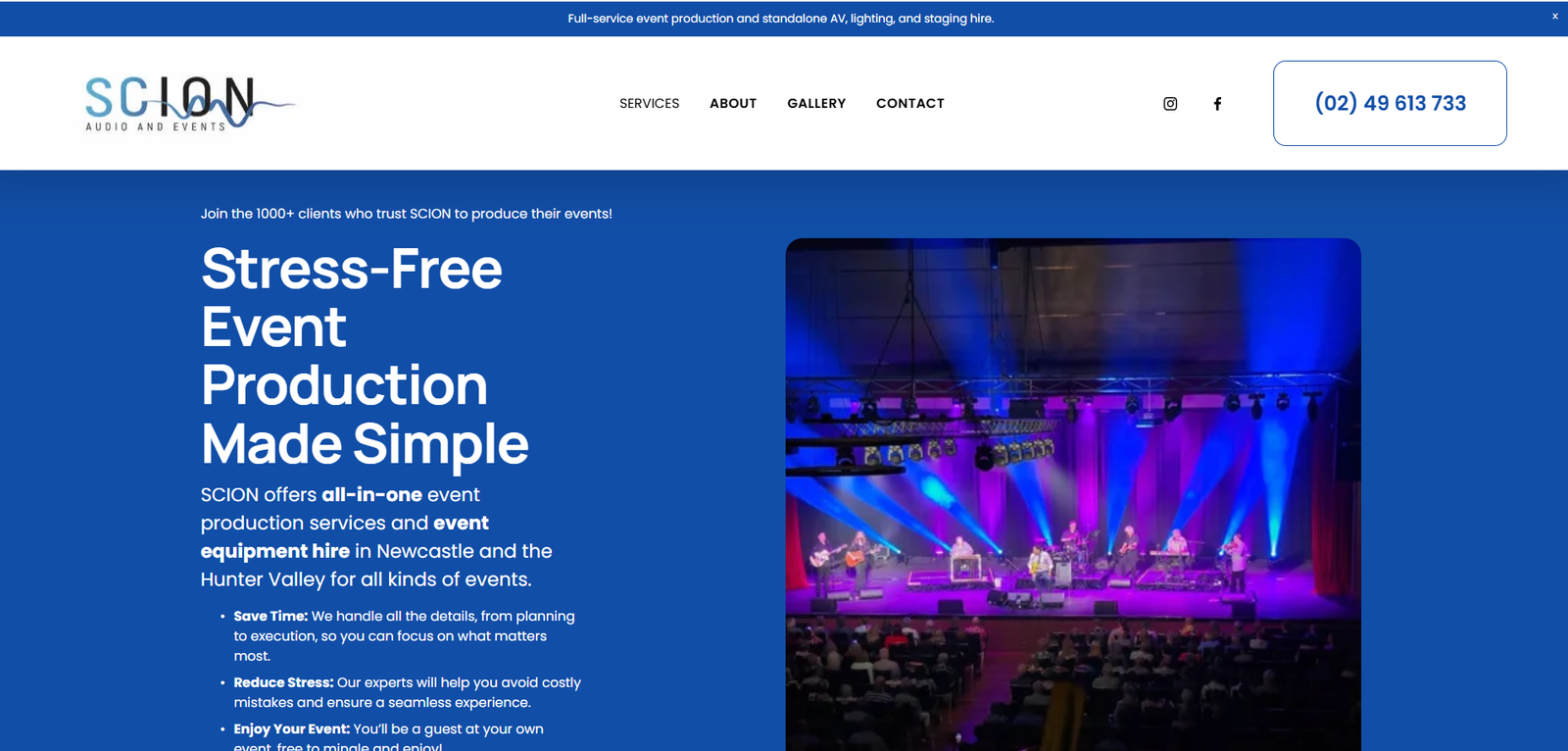
One of my more recent Squarespace projects was Scion Audio and Events, an event production company in Newcastle and the Hunter Region. I migrated the business from WordPress to Squarespace and built a much more substantial site around the business they had become.
This wasn’t a matter of copying the old pages into a new builder. I interviewed the client extensively, researched competitors and the market, used the StoryBrand framework to develop the messaging, and applied SEO thinking throughout the site structure and copy.
The finished website is robust, with detailed service content, galleries, blog content, calls to action and a clear path for customers who need help producing an event. It has performed very strongly in organic search and has also developed excellent visibility in AI-powered search. More importantly, the website made a substantial difference to the business.
That project is one of the reasons I’m comfortable recommending Squarespace when it fits the brief. The platform gave me a stable base, but the result came from the research, positioning, copy, SEO, design and depth of useful content built on top of it.
See the Squarespace project and the thinking behind the Scion Audio and Events website.
View the Scion Audio and Events Case StudyWhy migrate from WordPress to Squarespace?
WordPress is extraordinarily capable and I still build WordPress websites. There are also clients who simply don’t want to think about plugins, theme updates, hosting configurations and the maintenance that comes with an open ecosystem.
Squarespace is managed. For the right client, that means less technical housekeeping and a website they can comfortably update themselves. Adding a page, changing text, uploading work to a gallery or publishing a blog post is generally straightforward.
There’s also a healthy ecosystem of Squarespace designers and developers. If I build your website and years later you want somebody else to work on it, you aren’t dependent on me indefinitely. I think that matters. A business website should remain a business asset that the owner can continue developing.
Unsure whether Squarespace, WordPress, Webflow, Shopify or another platform fits your project? Platform choice is part of the strategy.
Explore Website Strategy & ConsultationThe built-in email marketing is a major advantage
Squarespace Email Campaigns is one of the platform’s advantages for small businesses because the email system sits alongside the website rather than feeling like a separate marketing stack.
You can build mailing lists, create branded campaigns, send newsletters and automated emails, and review campaign performance. Blog posts can be turned into email campaigns, and Squarespace AI can help generate a first draft of a campaign.
For a small Australian business, having the website, lead capture and email marketing in one ecosystem can be a real benefit. A theoretically more sophisticated stack isn’t much use if nobody in the business knows how to operate it.
Squarespace forms are genuinely capable
The native form builder is another area where Squarespace has matured. You can collect detailed information, connect submissions to storage and marketing tools, and use conditional follow-up questions so the form changes according to a visitor’s answers.
That means a service business can build a useful enquiry or qualification process without automatically paying for a separate form platform. The enquiry experience is part of the website, so I like having enough control to make that experience useful rather than settling for name, email and a blank message box.
The blog is one of Squarespace’s underrated strengths
Squarespace has a mature blogging system. Posts can be categorised and tagged, organised into archives and scheduled to publish automatically. For a business using content as part of its SEO strategy, that’s enough to run a serious publishing program without turning the blog into a technical project of its own.
There’s also a feature people often miss: Squarespace can host and manage a podcast. Audio episodes can be published through the site and syndicated through a built-in RSS feed to podcast services.
For consultants, educators, creatives and professional services, that means the same site can become the home of service pages, SEO articles, thought leadership and a podcast archive.
Galleries remain brilliant for visual businesses
Squarespace has always been particularly comfortable with visual work. Galleries and portfolio-style content are easy to build and, importantly, easy for a client to update later.
That makes it a natural fit for photographers, artists, architects, landscapers, builders, hospitality businesses, event companies, musicians and other businesses where the work needs to be seen. A gallery that looks good but requires a developer every time you want to add a project isn’t especially useful. Squarespace keeps that part practical.
Courses, memberships and digital products can live there too
Squarespace can go well beyond a brochure website. Course Pages let educators structure and sell online courses, while Member Sites can place pages behind free or paid membership access. Squarespace also supports digital products and paywalled content.
A coach or educator could therefore have a public website, blog, email list, paid course and members-only resource area within the same broader platform. That can be much easier to manage than assembling separate software for every part of the business.
Squarespace ecommerce can be the right amount of ecommerce
I wouldn’t automatically choose Squarespace for every ecommerce project. For a large or operationally complex online store, Shopify will often be the stronger specialist platform.
But plenty of businesses don’t need that level of ecommerce infrastructure. Squarespace can sell physical products, services, digital products, memberships and subscriptions, and it brings commerce together with the website’s content, email marketing and design system.
That can be particularly attractive for artists, authors, musicians, makers, educators and smaller product businesses. Your portfolio, content, mailing list and store can feel like one website rather than separate systems bolted together.
Third-party tools such as Elfsight extend it further
When Squarespace doesn’t provide the exact feature a project needs, embeddable tools can fill some useful gaps. Elfsight, for example, offers widgets for Google Reviews, pop-ups, forms, event calendars, calculators, WhatsApp chat, social feeds, audio players, countdown timers and AI chatbots.
I particularly like this approach when the feature is useful but doesn’t justify turning the whole website into a custom software project. A local business might simply want its Google Reviews displayed automatically or a better pop-up. That can be added without changing the platform underneath the site.
And Squarespace has Unfold for social content
Squarespace also owns Unfold, a separate app for creating branded social content. It includes templates and tools for stories, posts and video, with publishing and scheduling features.
I wouldn’t choose a website platform because of a social-content app, but it fits the broader Squarespace philosophy: giving small businesses and creative organisations a useful collection of connected tools without requiring the owner to become a software integrator.
There is one design compromise: tablets
Squarespace can look excellent on large screens and mobile phones. The in-between tablet view is where I think the design system needs more care.
Fluid Engine gives you dedicated desktop and mobile arrangements, but it doesn’t give a designer the same granular breakpoint control you’d expect from a more developer-oriented platform. You can compensate with sensible layouts, responsive sizing, testing and custom CSS where appropriate, but I wouldn’t pretend tablet-specific design control is one of Squarespace’s strengths.
For many service-business websites, I’m comfortable with that trade-off. You get a lot of simplicity and stability elsewhere. The important thing is knowing the limitation, designing around it and deciding whether it matters for the particular project.
Squarespace is mature, stable and widely supported
Squarespace has been around for more than two decades. That maturity matters. Hosting and much of the underlying infrastructure are managed, the platform has extensive documentation and there’s a large ecosystem of people who know how to work with it.
It’s used across a broad range of businesses and organisations: creative professionals, artists, musicians, coaches, educators, charities, restaurants, hospitality businesses, law firms, mortgage brokers and other professional services. Those businesses often want a polished site with serious capabilities without taking on unnecessary technical maintenance.
There’s value in boring reliability. Three years after launch, the forms still need to work, the owner still needs to be able to publish something and the site still needs to be manageable.
A business website should be designed around the business first, then built on the platform that best supports it.
Explore Business Website DesignWho is Squarespace particularly good for?
I tend to like Squarespace for businesses that value strong design, content and ease of management. That includes many consultants, professional services, creative businesses, coaches, educators, hospitality businesses, event companies, artists, musicians, charities and smaller ecommerce operations.
It can also be an excellent option for businesses that have had enough of maintaining a more complicated stack and want the website to become simpler without becoming simplistic.
The real appeal is how much sits under one roof
Put the pieces together and Squarespace looks quite different from the basic template builder it is sometimes made out to be. A business can potentially have a custom-looking website, ecommerce, appointment booking, email marketing, a substantial SEO blog, podcast publishing, galleries, advanced forms, courses, member areas, subscriptions, digital products, analytics, social-content tools and carefully chosen third-party integrations.
Custom HTML, CSS and JavaScript can extend the experience further when the project calls for it, and AI-assisted design and coding tools have raised that ceiling again.
There are platforms that give developers more granular control and specialist systems with deeper features in individual areas. Squarespace’s strength is the amount of capability it brings together while remaining approachable for the person who eventually has to run the website.
Looking for a Squarespace designer in Australia?
Mojo Mesh designs Squarespace websites for Australian businesses alongside WordPress, Webflow, Shopify and newer custom development platforms. I don’t need Squarespace to be the answer to every project, which makes it easier to recommend it when it genuinely is the right fit.
The starting point is understanding your business, your customers, your message and what the website needs to accomplish. Then we can choose the platform and build around that.
If you already know you want Squarespace, explore the service. If you’re still comparing platforms, start with a website strategy conversation.
Explore Squarespace Website DesignUseful Squarespace resources
For more detail on the platform itself, Squarespace’s official Fluid Engine, SEO, ecommerce and content resources are worth exploring. For design inspiration, curated Squarespace galleries and showcase sites can also be useful—but I’d treat them as references rather than recipes. The best Squarespace website is the one designed around the business it actually needs to serve.
Common questions
Can a Squarespace website be custom designed?
Yes. Squarespace 7.1 uses Fluid Engine, a flexible grid-based editor that allows blocks to be moved, resized and layered. A designer can also use saved custom sections, CSS and code-based enhancements where appropriate to create a site that looks substantially different from a standard template.
Is Squarespace good for SEO in Australia?
Squarespace has strong technical SEO foundations, including automatic sitemaps, robots.txt, clean HTML, structured data, mobile optimisation and editable metadata. Its current SEO tools also include AI-assisted recommendations. Strong results still depend on strategy, content, search intent, site structure and authority.
Is Squarespace suitable for ecommerce?
Yes, particularly for smaller and medium-sized stores, creatives and businesses that want commerce integrated with their content and marketing. Squarespace can sell physical products, services, digital products, memberships and subscriptions. Larger or operationally complex stores may be better suited to a specialist ecommerce platform such as Shopify.
Can I move from WordPress to Squarespace?
Yes. A WordPress site can be migrated to Squarespace, although the project should be treated as a strategic rebuild rather than simply copying pages. It is an opportunity to improve structure, messaging, SEO, design and the way the site is managed.
Can Squarespace host courses and member-only content?
Yes. Squarespace supports Course Pages, Member Sites, pricing plans and paywalled digital content, allowing businesses and educators to sell courses, memberships and other digital products within the Squarespace ecosystem.
Can a Squarespace designer use AI tools such as Claude?
Yes. AI tools can assist with layout exploration, content structure and custom code for responsive interactive sections. The quality still depends on human direction, testing, accessibility, responsiveness and making sure the result fits the website’s design system.
Want a second opinion on your own site?
Start your project