Greenora Webflow Template Review: Is It Good for Landscaping Websites?
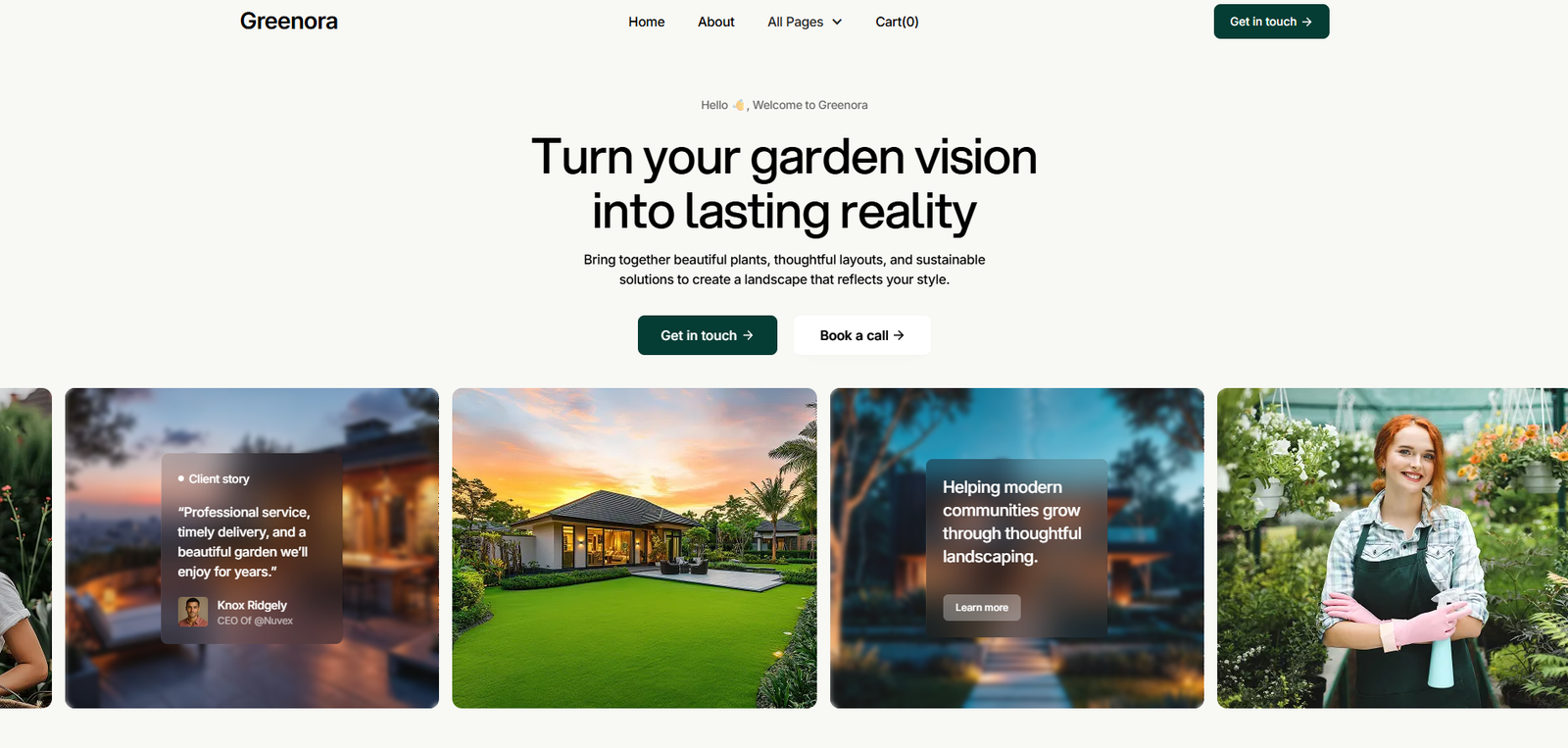
Considering Greenora for a landscaping website? See what this Webflow template does well, what I’d change, its SEO potential and who it suits.
If I were building a Webflow website for a landscaping company and wanted a strong template to start from, Greenora would be high on my list.
Why? Because it already looks and feels like a landscaping website.
That might sound simple, but it matters. Starting with an industry-specific template can save a considerable amount of design and development time compared with taking a generic business template and trying to force it into the landscaping industry.
Greenora gives you a foundation for showcasing services, completed projects, company information, articles, FAQs and enquiries. For the right landscaping company, that means more of the project budget can go towards the things that actually make the website unique: photography, copy, positioning, SEO and conversion.
Greenora is only one option, too. Webflow currently has more than 20 landscaping and landscape-design templates in its marketplace search, including some incredibly beautiful designs worth comparing before making a decision.
Is Greenora a Good Webflow Template for Landscaping Companies?
Yes. Greenora is a strong Webflow template for landscaping companies, particularly businesses that need to showcase multiple services and a portfolio of completed projects.
It provides much of the website structure a landscaper is likely to need, including service pages, project showcases, CMS content, team pages, FAQs, forms and other conversion-focused sections.
I would still treat Greenora as a framework rather than a finished website. The value comes from adapting it around the actual landscaping business: genuine project photography, the right services, stronger trust signals, useful calls to action and content aimed at the customers the business wants to attract.
What Is the Greenora Webflow Template?
Greenora is a landscaping and gardening website template built for Webflow. You can view Greenora on Webflow before deciding whether its visual direction suits your business.
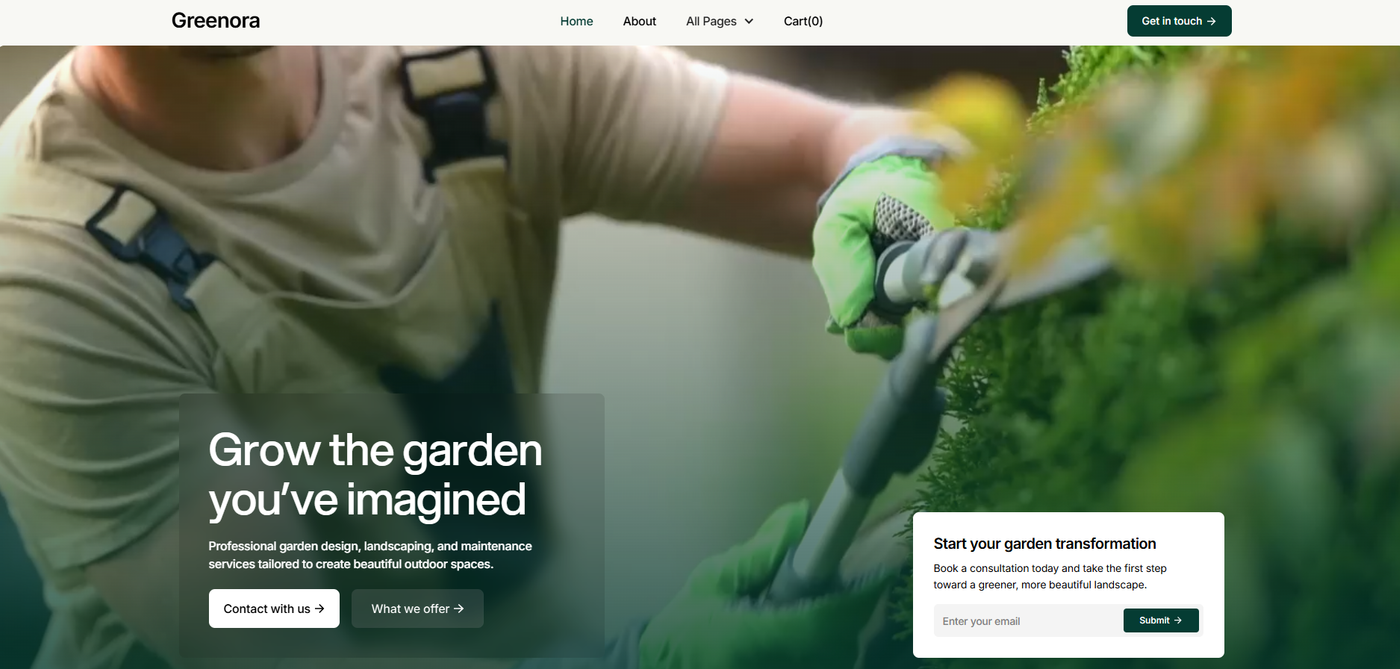
It is designed for businesses such as landscaping companies, garden maintenance providers, lawn care services, landscape designers, irrigation specialists, hardscaping companies and other outdoor-service businesses.
The template includes more than 40 landscaping-specific section layouts alongside service pages, project showcases, CMS-powered blog content, team pages, pricing, FAQs, contact forms, responsive layouts and Webflow interactions.
What Does Greenora Get Right?
The Design Already Feels Like a Landscaping Website
One of Greenora's biggest advantages is that it doesn't look like a generic corporate website with a few garden photos dropped into it. The visual direction already suits landscaping and outdoor services.
There are plenty of attractive general-purpose Webflow templates available, but adapting one to an entirely different industry can create almost as much work as designing sections from scratch. Greenora starts much closer to the finished product.
Landscaping Photography Gets the Space It Deserves
Landscaping is incredibly visual work. A finished garden, pool surround, retaining wall, paved entertaining area or complete backyard transformation can communicate the quality of a company's work faster than several paragraphs of sales copy.
Potential customers want to see what you can do. Photography should be part of the sales process rather than decoration. Greenora gives project imagery enough space to make an impact while still leaving room for services, company information and calls to action.
Are Greenora's Project Pages Good for Landscaping SEO?
They certainly have the potential to be. Projects should be a major part of a landscaping website, and individual project pages can do considerably more than a basic image gallery.
Turn Completed Landscaping Jobs Into Case Studies
Instead of uploading six photographs and calling the page Project 14, I would turn important projects into genuine case studies. Cover the client's brief, project location, services provided, site challenges, design considerations, materials, construction details, before-and-after photography and the completed result.
That creates a much more useful page for someone researching a landscaping company. It also gives search engines and answer engines more context about what the business actually does.
Use Genuine Project Locations Naturally
Project pages can provide valuable geographic context for local landscaping businesses. Backyard Transformation in Merewether tells a potential customer what kind of project they're looking at and where it happened. Project 14 tells them very little.
The location should be there because it is genuinely relevant to the project. Real completed work can naturally demonstrate where a landscaping company operates without producing repetitive location pages.
Why Separate Landscaping Service Pages Matter
A landscaping company might offer landscape design, landscape construction, paving, retaining walls, irrigation, turf installation, planting, garden maintenance, pool landscaping and outdoor entertaining areas.
Those services don't all need to be squeezed onto one enormous page. If a service is important to the business, a dedicated page gives us room to explain it properly, answer customer questions, show relevant completed projects and guide the visitor towards the next step.
The final structure should reflect the services the landscaping company genuinely offers and, ideally, the work it wants more of.
How Useful Is Greenora's Webflow CMS?
The CMS is one of the features that makes Greenora useful as a long-term website rather than just an attractive brochure. New projects get completed. New photos become available. Services evolve. Customer questions change. The website should be able to grow with the business.
Use the CMS for Landscaping Projects
Greenora uses Webflow CMS for repeating content such as projects and blog posts. Once the CMS structure is configured properly, new completed projects can be added without manually rebuilding the same page layout every time.
Use the CMS to Answer Customer Questions
A landscaping company has plenty of useful questions it can answer: How much does landscaping cost? How long does a landscaping project take? What should I prepare before requesting a quote? Do I need approval for a retaining wall? When is the best time to install turf?
These are questions potential customers genuinely ask before spending money on landscaping. Answering them clearly can make the website more useful while creating content suited to conventional search, AI-powered answer engines and conversational searches.
What Would I Change Before Launching Greenora?
This is where the real work starts. I wouldn't buy Greenora, swap the logo and phone number, replace a few photos and call the website finished.
1. Replace the Template Photography With Real Landscaping Projects
For a landscaper, genuine project photography is one of the strongest assets on the entire website. I would replace the template imagery with the best real work available: wide finished-project images, detail photographs, before-and-after shots and images showing different types of landscaping work.
2. Rewrite the Homepage Around the Actual Business
A template homepage has to be generic enough to sell the template to many businesses. The finished homepage shouldn't be. It should quickly explain what the company does, who it works with, where it works and why someone should choose it.
3. Build Service Pages Around the Work You Want More Of
I would research what potential customers are searching for and compare that with the work the business actually wants. That intersection should help shape the website rather than keeping a page simply because the demo includes it.
4. Add Stronger Trust Signals
Landscaping projects can involve serious money. Depending on the company, I would look for genuine customer reviews, testimonials, relevant licences, qualifications, industry memberships, awards, team profiles, detailed case studies, before-and-after photography and a clear explanation of the design and construction process.
5. Strengthen the Calls to Action
A beautiful landscaping website isn't particularly useful if visitors don't know what to do next. Calls to action might include Request a Landscaping Quote, Discuss Your Project, Book a Design Consultation, Tell Us About Your Backyard or View Our Landscaping Projects. The right choice depends on the business and the page.
Is Greenora Good for Landscaping SEO?
Yes, Greenora can provide a useful foundation for landscaping SEO. It supports individual services, projects, CMS content and a logical website structure. Rankings will still depend on the finished website and the competition around it.
Optimize Every Important Page
Before launch, I would review page titles, meta descriptions, heading structure, URLs, internal links, image file sizes, alt text, service content, project content, mobile usability, calls to action, indexing requirements and structured data.
A page shouldn't exist simply because it came with the template. Every important indexable page should have a purpose and enough useful original information to justify being there.
Build Genuine Local Relevance
Local SEO matters for most landscaping companies because they usually operate within a defined geographic area. Real project pages, accurate business details, service-area information, relevant testimonials and useful local information can demonstrate where the company works without turning every page into a list of suburb names.
Add Appropriate Structured Data
Structured data can help search engines understand information about a business and its website. The markup should accurately describe visible content on the page. The same principle applies to FAQs: include them because they're useful to customers, not because you're expecting a special search result.
Is Greenora Good for AEO and Voice Search?
It can be, but AEO and conversational search depend much more on the content you put into Greenora than on the template itself.
People often search conversationally. Someone might type landscaper Newcastle, then ask an AI assistant or voice search, Who can design and build a backyard in Newcastle? Good landscaping content should handle both behaviours with clear headings, natural questions, concise answers and detailed supporting information.
Greenora vs Other Webflow Landscaping Templates
Greenora is one of more than 20 landscaping-related options currently visible in Webflow's landscaping template marketplace search. Some are excellent, and comparing them can save a client from paying to recreate standard website sections from scratch.
I would compare the overall visual direction, project layouts, service-page structure, CMS requirements, navigation, mobile layouts, conversion opportunities, ease of customisation and how well the design suits the company's photography and positioning. The prettiest template isn't automatically the best choice.
Who Is Greenora Best For?
I would consider Greenora for established landscaping companies, landscape designers, landscape architects, design-and-construct landscapers, garden designers, hardscaping companies, outdoor-living specialists, garden maintenance businesses, lawn care providers and irrigation businesses.
It becomes particularly attractive when the business already has a strong collection of professional project photography.
Who Probably Doesn't Need Greenora?
A small mowing business that needs a three-page website, phone number and quote form may not benefit from an extensive project CMS, article library and large service structure. A simpler website could be cheaper to build, easier to maintain and more appropriate for what its customers need.
Greenora Webflow Template: Pros and Cons
Greenora Pros
Industry-specific design, strong project presentation, separate service structure, Webflow CMS, responsive layouts, plenty of room for conversion content and a strong visual foundation for good landscaping photography.
Greenora Cons
It still needs significant customisation. Demo content cannot replace original business content. A highly visual design needs strong photography. It may be excessive for very small operators, and the supplied page structure should never dictate the final SEO strategy.
Final Verdict: Is Greenora Worth Using?
For the right landscaping company, I think Greenora is a strong starting point. It already speaks the visual language of landscaping, and it provides useful places for services, projects, articles, FAQs, team members, testimonials and contact information.
I would still expect to change plenty before launch. The photography needs to reflect the company's actual work. The copy needs to explain the business clearly. The service architecture needs to match the work it wants. Project pages need genuine substance. Calls to action need to fit the customer journey. SEO needs to be planned rather than assumed.
Do all of that properly, and Greenora could form the foundation of an excellent landscaping website. A good Webflow template should give the project a head start while leaving plenty of room to make the finished website unmistakably yours.
Like the look of Greenora, or one of the other beautiful landscaping templates on Webflow? Contact David Rivers at Mojo Mesh. I’ll be glad to use the right Webflow template as a starting point and turn it into a website built around your landscaping business, your projects and the customers you want to reach.
Talk to David About Your WebsiteCommon questions
Is Greenora made specifically for landscaping companies?
Yes. Greenora is designed for landscaping, gardening and related outdoor-service businesses. Its layouts support common landscaping website requirements such as services, projects, testimonials, team information, articles, FAQs and enquiries.
Does Greenora use Webflow CMS?
Yes. Greenora includes CMS-powered content for areas such as projects and blog posts, making it suitable for landscaping companies that want to continue adding new work and useful content after launch.
Can Greenora be customised for a local landscaping company?
Yes. I would consider customisation essential. The demo photography, copy, services, project information, branding, calls to action and business information should all be adapted to the actual landscaping company.
Is Greenora good for SEO?
Greenora provides a useful foundation for SEO because it supports individual service pages, projects, CMS content and a structured website. Rankings will depend on the finished website's content, technical setup, competition, authority, local relevance and overall SEO strategy, not the template alone.
Can I add landscaping projects to Greenora?
Yes. The project CMS structure is one of the template's most useful features. Completed landscaping jobs can become detailed case studies containing project information, photography, services, locations and results.
Do I need coding knowledge to customise Greenora?
Many design and content changes can be handled through Webflow's visual development environment. The amount of Webflow knowledge required depends on how extensively you want to modify the original template and whether you are changing its underlying structure or functionality.
Should every landscaping service have its own page?
Not necessarily. Important services can benefit from dedicated pages when there is enough useful information to warrant them. Build pages around genuine customer needs, meaningful services and the work the business wants to attract.
How many landscaping templates does Webflow have?
Webflow's landscaping marketplace search currently shows more than 20 relevant landscaping and landscape-design templates. The available selection changes as new templates are added.
Can Mojo Mesh customise a Webflow landscaping template for my business?
Yes. David Rivers at Mojo Mesh can use a suitable Webflow template as the starting point and customise the website around your landscaping services, project photography, brand, content, SEO and enquiry process.
Want a second opinion on your own site?
Start your project